Showing posts with label linux. Show all posts
How To Recover Lost Ubuntu Password In 2 Minutes || #softwareduck

How To Recover Lost Ubuntu Password In 2 Minutes || #softwareduck

This might be a shocker for the beginner Linux enthusiast. All the big talks about Linux being secured and all, but in reality it takes less than 5 minutes to hack in to world’s most popular Linux distribution Ubuntu. Shocked! I am not bragging here. Its true. Lets see how can you hack login password to gain access in to Ubuntu. Lets see step by step how to hack Ubuntu password.

Step 1:

Switch the computer on. Go to Grub menu. Generally it appears automatically, if not then hold down the shift key until the boot menu appears. In the grub menu, choose for the “recovery mode” option.
It will bring you a black screen with several lines of output being displayed in a flash. Wait for few seconds here.

Step 2:

Now you will be present with different options of recovery mode. Here you need to choose “Root Drop into root shell prompt“. Like in the picture below:

Step 3:

Here, you will be presented with root access (why? Is this not a security fault?) without prompting any password. Use the following command to list all the users available:
ls /home
From the previous command choose the “username” for which you want to reset or (say) hack the password. Now, use the following command to reset the password for the selected “username“:
passwd username
It prompts for new password. Enter the new password twice:
Enter new UNIX password:
Retype new UNIX password:
Voilà! There you go. You have just cracked it and now you can easily enter into the system.

Possible Troubleshoot:

While entering the new password you might be prompt with Authentication manipulation error like this:
passwd username
Enter new UNIX password:
Retype new UNIX password:
passwd: Authentication token manipulation error
passwd: password unchanged
The reason for this error is that file system is mounted with read access only. Change the access and remount the file system in the following manner:
mount -rw -o remount /
Now try to reset the password again. It should work now.
Were you successful in this hacking attempt? Or did you face any problem? Do let me know. Cheers :)

Lazykali Introduction and Installation | Installation of LazyKali on Kali Linux | Installation of Hackpack:


LazyKali is an awesome script written in bash shell. It can automate the whole update and install new tools in your hack repository. As the name suggests, you can get all the updates on Kali Linux and your repositories in one place by running this script. Please read the description of the project here to know what tools are there that are going to be added when you run the script.

Installation of LazyKali on Kali Linux:

1. Download the Lazy Kali Script into it’s own directory

Root terminal

mkdir lazykali

*******

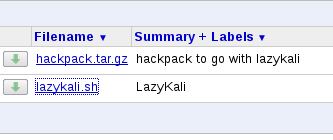
Downloads Tab > LazyKali

lazykali

lazikali2
*******Downloading*** you run lazykali from the directory where it was downloaded.

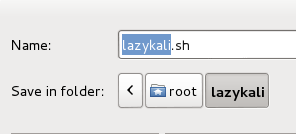
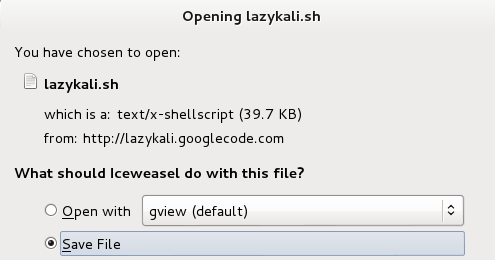
Save File

 root

lazykali3

****Make the Script executable*****

chmod +x lazykali.sh

*****

2. Change Directory and then run Lazy Kali.

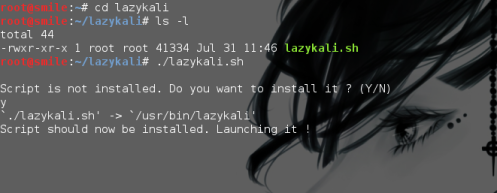
cd lazykali

./lazykali.sh

Yes

cd into lazy kali


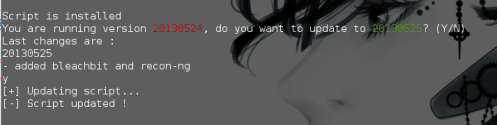
Script will confirm that it’s installed.

script installed
·                       

       ***Menu of lazykali***

·      

  Option -> 1) Update kali to Update Kali Linux. 


·         Option->  2) Metasploit Services
1          
·         Option-> 4) EXPLOITDB
·         
      Option->  5) Sniffing and Spoofing
 (Note this subsection has multiple entries – schedule some time, to install each tool separately.)
·         
      Sub-Option ->1) Yamas  (Image Sniffing And Spoofing Tool )
·         Sub-Option -> 3) PwnStar
·         Sub-Option-> 6) Hamster
·         Option-> 6) Install Extra’s
·         This is the critical section 6, that you’re all looking for – as it includes Flash, Ettercap, Nautilus and Java.


·         You can install them separately or Option 17 – ALL.  I opted to install them separately, to double check for errors before proceeding.


    Installation of Hackpack:
  è  Download Hackpack zipped file from following link:
  è goto terminal and type following command to unzip the file:
                 tar -zxvf hackpack.tar.gz
  è  Open Hackpack directory and follow readme file for installation.


        Hackpack menu:

       Click on Applications on the top left corner of Kali Desktop and you will find Hackpack tab.