Showing posts with label Offline Installer. Show all posts
Download Adobe Flash Player 18 Offline Installers

Download Adobe Flash Player 18 Offline Installers

Adobe Flash Player 18 has been released and is available for download and testing. The new release has been codenamed Presidio. The new Flash Player 18 includes enhancements and bug fixes related to performance, security, stability and device compatibility. The fixes are for both Flash Player 18 and Adobe Air 18.
Flash Player 18 is in beta at the time of this writing. The latest final stable version of of Flash is Flash Player 17. Normally if you have Flash Player installed on your computer, the new updates will be downloaded and installed automatically but this is not the case with the beta version. If you want to test the latest version of Flash Player, you will need to download and install it yourself instead of using the updater function of the utility.

Download links

There are a few enhancements and new features included in Flash Player 17 which we will discuss later in this article but first here are the direct download links to the Flash Player 17 offline installers:
Please note that these installers are not compatible with Windows 8. If you are a Windows 8 or Windows 8.1 user, you will have a custom build of Flash Player which will be updated with Windows Update. But if you are using a third party browser like Firefox or Google Chrome, you may install the appropriate Flash Player installers on your system.

Features and enhancements

Let’s go through some of the features and enhancements made in Flash Player 18.
  • VideoTexture for Android is supported which will help developers with easier code implementation and faster videos on Android devices
  • Flash Player install process has been improved. Now there are very less cases where Flash will ask the user to shutdown the currently running browsers in order to install properly
  • Audio APIs have been added to Flash Player NPAPI
  • Browser Zoom Factor for PPAPI Plugin and non-Win 8x ActiveX has been introduced in this release. This will enable Flash videos to be zoomed in and out in the browser

Fixed Issues in Flash Player 18

Some issues have been fixes from Flash Player 17. Here’s the list:
  • Corrects an injection in 17.0.0.169 that causes improperly encoded Nellymoser streams to play back at a fast rate (3970536)
  • Mac 10.6.8 – Corrects an issue where keystrokes were not received when the input language was CHT (Canjie, New Quick, Phonetic)
    (3809685)
  • Mac, Safari – Corrects an injection in 16.0.0.305 that caused a hang on some content (3955834) (AAPL 20218614)
  • Windows 8.1, Firefox Nightly – Right-clicking on JWPlayer videos no longer causes Flash Player to hang (3835579)
  • PPAPI Linux – Resolves rendering problems with Stage3D/StageVideo content with several Stage3D/StageVideo instances (3924242)
For detailed report of what has been changed in the version 18, you may see Flash Player 18 release notes.

Uninstalling Flash Player 18

If you are not satisfied with this release of Flash Player 18, you can uninstall this build using the method given below:

Windows

  1. Download the Flash Player beta uninstaller for Windows
  2. Go to your download folder.
  3. Find the uninstaller file, double-click it and follow the prompts.

Macintosh

  1. Download the Flash Player beta uninstaller for Mac OS X
  2. Go to your download folder.
  3. Find the uninstaller file, double-click it and follow the prompts.
Bitdefender 2015 Total Security Beta License Keys are Here !

Bitdefender 2015 Total Security Beta License Keys are Here !

Bitdefender 2015 beta
Bitdefender released the first betas of their well know virus guard applications including Total Security 2015.At the moment the best way to activate it for more than 69 days is given below
Bitdefender has often performed well in our yearly group tests, so we were looking forward to seeing if the latest version of Internet Security could continue the good work. We’re fans of the way you can choose during the install process which elements of the software will be active, or simply opt for the auto-pilot mode which looks after everything for you – perfect for inexperienced users.
See Also
How to Activate ?
  1. Install Bitdefender Total Security 2015 beta trial
  2. After installation, Bitdefender will launch and ask for a key
  3. Paste one of the keys given below and register it
  4. You will get a license period of 4 months :)
We are working for a crack. Subscribe to Us, so you can be the first to use it

License Keys
LCEXRF7 – 1 year
0ZE5LZP – 1 year
P5UA7KP – 1 year
KDAGD5H – 1 year
EM4VCU4 – 1 year
SEGH2XM – 1 year
U2VSMAB – 1 year
E52HEDV – 90 days
SVYYTWD – 90 days
K17X3CG – 60 days
B4F2YYR – 200 days
2YRGQZD – 140 days
ZSEWDYO – 140 days
LEMLUJO – 140 days
AV3UPA3 – 140 days
2YRGQZD – 140 days
ZSEWDYO – 140 days
LEMLUJO – 140 days
AV3UPA3 – 140 days
NSWCJCM – 1 year
Key’s don’t work ?
its ok ! we got the 2015 bitdefender crack :) click the link given below

Bitdefender 2015 All Security Products Crack is Here !

Setup Download (these keys are only for Total Security) – links by onhax community
Bitdefender 2015 ProductOffline SetupWeb Setup
32 bit64 bit
Bitdefender Antivirus Plus finalDownload (352 MB)Download (389 MB)Download (7 MB)
Bitdefender Internet Security finalDownload (418 MB)Download (455 MB)Download (7 MB)
Bitdefender Total Security finalDownload (422 MB)Download (459 MB)Download (7 MB)
Bitdefender Windows 8 SecurityDownload(363 MB)Download(411 MB)Download (7 MB)
Bitdefender Antivirus FreeDownload (158 KB)
Screenshots

Bitdefender Total Security 2015 Official Giveaway Is Here

Bitdefender Total Security 2015 Official Giveaway Is Here

Bitdefender Security Suite 2015
Bitdefender Security Suite 2015 edition, is a full security suite that keeps you safe online. The application has numerous integral services included, such as antivirus, firewall, a USB drive immuniser, strong browsing and privacy tools, social networking protection, parental controls and a spam filter.Bitdefender is award winning software, which protects every avenue of your system with secure features that are robust and have the lowest impact on your PC’s performance. In fact, OneClick Security from Bitdefender is so simple to use, you only need one click to be safe.
How To Get?
  1. Go To Link Provided
  2. Put Your E-Mail
  3. And Click On The Green Button
  4. Done :)
Screenshot
Screenshot_2
Link To Register

Bitdefender Total Security 2015 Serial Keys Are Here![Official Giveaway]

Bitdefender Total Security 2015 Serial Keys Are Here![Official Giveaway]

Bitdefender Total Security 2015
It builds on technology awarded Best Protection and Best Performance to defend your device with just one click. Lock confidential files in an encrypted vault and use Bitdefender Safebox™ to securely stores photos and videos online. Device Anti-Theft helps recover your device in case of loss or theft.
Features
  • Best Security of 2014, PC MAG.
  • Imperceptible. Fastest System Speed. Confirmed by AV-TEST.
  • Easy to Use. Simple to Understand. Handle Security with a Single Click.
  • Store and Protect your Personal Photos and Videos. Secure Online Backup.
  • Recover your Device in case of Loss or Theft. Device Anti-Theft
How To get Keys?
  1. Go to the below mentioned Official Giveaway Page.
  2. Enter your Email Id in the First box and type Captcha in the Second box.
  3. You will receive a mail with the License Key. :)
Screenshots
Links

BitDefender 2015 Total Security Serial Keys are here! [27/3/15]

BitDefender 2015 Total Security Serial Keys are here! [27/3/15]

Bitdefender Total Security 2015
It builds on technology awarded Best Protection and Best Performance to defend your device with just one click. Lock confidential files in an encrypted vault and use Bitdefender Safebox™ to securely stores photos and videos online. Device Anti-Theft helps recover your device in case of loss or theft.
  • Best Protection for 3 Straight Years. Best Security of 2014, PC MAG.
  • Imperceptible. Fastest System Speed. Confirmed by AV-TEST.
  • Easy to Use. Simple to Understand. Handle Security with a Single Click.
  • Store and Protect your Personal Photos and Videos. Secure Online Backup.
  • Recover your Device in case of Loss or Theft. Device Anti-Theft
UPDATE: These keys also work “Bitdefender Windows 8 Security 2015″.

Screenshots:
Serial Keys (Last Updated on: 27/3/15)
0ZE5LZP / P5UA7KP / KDAGD5H / EM4VCU4 / SEGH2XM / U2VSMAB / E52HEDV / SVYYTWD / K17X3CG / B4F2YYR / 2YRGQZD / ZSEWDYO / LEMLUJO / AV3UPA3 / 2YRGQZD / ZSEWDYO / LEMLUJO / AV3UPA3 / NSWCJCM / J5PFKVF / VDCYLI6
Note: Some of the keys above might have expired, please don’t worry and use other keys. Also please mention your problem in the comment so we can replace the expired key with a brand new one! :D
Downloads (keys works only for a selected product)
Bitdefender 2015 ProductOffline SetupWeb Setup
32 bit64 bit
Bitdefender Antivirus Plus finalDownload (352 MB)Download (389 MB)Download (7 MB)
Bitdefender Internet Security finalDownload (418 MB)Download (455 MB)Download (7 MB)
Bitdefender Total Security finalDownload (422 MB)Download (459 MB)Download (7 MB)
Bitdefender Windows 8 SecurityDownload(363 MB)Download(411 MB)Download (7 MB)
Bitdefender Antivirus FreeDownload (158 KB)

BlueStacks App Player 0.9.11.4119 Mode + Root HD 2015 Offline Install & Full Download [LATEST]

BlueStacks App Player 0.9.11.4119 Mode + Root HD 2015 Offline Install & Full Download [LATEST]

BlueStacks App Player

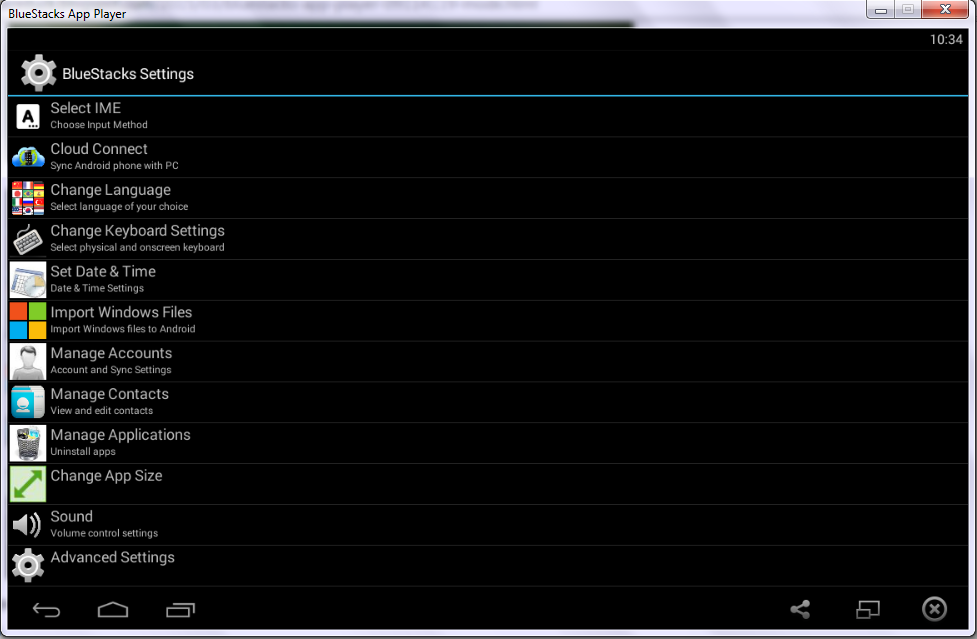
BlueStacks HD App Player Pro is a plate form that allows you to run applications, including games written for OS Android – on desktops, laptops and tablets and also this package contains all files to install it offline. This is a special program that uses a technology called Layer Cake, which provides the correct environment for running applications for ARM-Android on a computer running Windows. Get Root (right super – user).
After you install BlueStacks on your Windows PC, you can download directly from the program needed Android-app, without having to use the Android-based smartphone. BlueStacks looks pretty neat and fits naturally into the interface Windows.
Features List
  • Run Android applications in full-screen and not only.
  • Through the cloud download your application from the phone to Windows.
  • In 16 player preins talled applications and you can play them if there is no number.
  • Ability to set an unlimited number of applications.
  • Ability to play 3D games (cache).
  • You can set a home screen (Launcher) to replace the standard, etc.
  • Sync with your Android device will allow you to make calls, send SMS, take pictures and more.
  • Has a lot of settings and system settings Android (Although they are slightly trimmed)
  • Knows how to install applications from a computer at the touch of them
  • Ability to obtain Root (full access to the file system, etc.)
  • You can set Google Play, simply speaking market.
  • BlueStacks great friends with ADB is a very big plus, if you really want, you can change the firmware.
  • Ability to turn in Fast Boot and Recovery.
  • BluesStacks has virtual disk, such as SD Card, Data, and a few others. Which again gives you the opportunity to do a lot of “body” motions with it and enjoy all its charms.
  • Ability to obtain Root (full access to the file system)
What’s New ?
  • Bug fixed and improved performance
Older Cracked Version Info
  • Simple Launcher Interface
  • SuperUser Support
  • SuperSu Support
  • Import Windows Files directly from your PC to bluestacks
  • Root Explorer Support
  • Advanced Calculator Support
  • Clock, Camera, and other accessories support
  • Root Checker Support
  • Build in Media Player which run mp3, mp4 and many other formats easily
  • Many more…
How to Run Speed Up BlueStacks ?
  • Press Start Button with “R” Key [image]
  • Search the regedit in newly opened windows [image]
  • Click on HEKY_LOCAL_MACHINE >>> SOFTWARE [image]
  • Then select Bluestacks >>> Android >>> Hit enter on Memory and replace 300 to 600; then click on decimal and click “OK” [image]
  • That’s it; you will have successfully speed up your bluestacks
How to Install?
  • Extract winrar files and run given app as an administrator
  • Just wait and follow the instructions during installation of setup into your PC
  • After Completing the installation; Bluestacks will automatically launch; just select some options which will appear on screen
  • That’s it. Now run your all apps which supports the Android 4.4.2 & 5.0.1 and earlier. :)
Screenshots


Requirements!
  • To run 3D games need support virtualization technology Intel® VT-x or AMD-V ™
  • To install the BlueStacks need a video card that supports OpenGL 2.0 or later
  • To start BlueStacks need about 1GB of RAM, otherwise you run the risk of “infinite loading”.
  • For optimum performance, BlueStacks is highly desirable to update your graphics card drivers
  • NVIDIA – (WHQL – certified, stable drivers. Beta – unstable, but can increase in speed)
  • AMD RADEON – (Download drivers – Category components: Desktop / Notebook Graphics)
  • INTEL – (family of products: graphics adapters)
                                Downloads
OLDER STABLE VERSIONS